
Exporting trial balance from Dynamics 365 for Finance and Operations is a common ask for consolidation purpose by third party software’s like blackline ,Hyperion etc.
I have uploaded a code sample for generating report in csv format on my github page.
The following steps would help you to configure this project and a successful test.
- Set up Azure blob name and blob connection string in Sys admin > System parameters > ASP Integrations tab as shown below
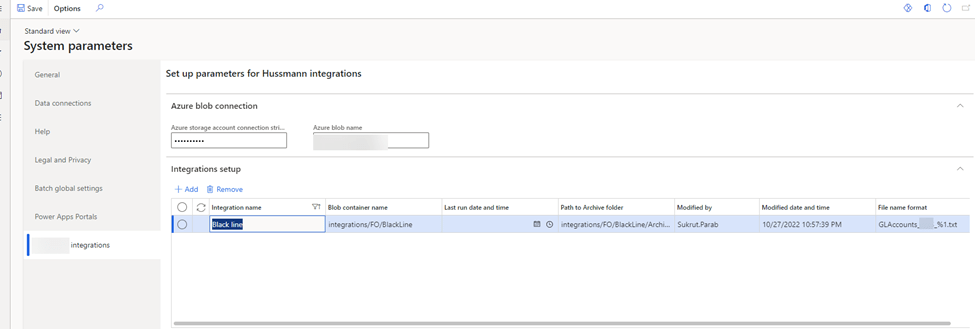
As you can see in the above screen , you have to specify blob container reference to store that in Azure blob. Select blackline in the integration name and configure file name. File name is configurable.
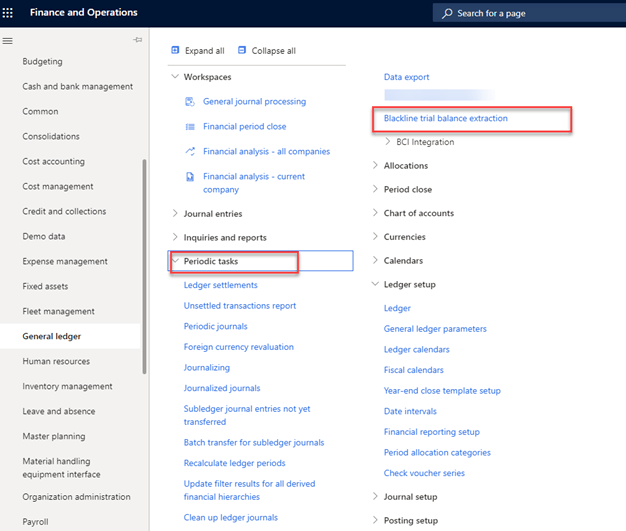
2.Visit General Ledger > Periodic tasks > Black line trial balance extraction and set up batch job recurrence.
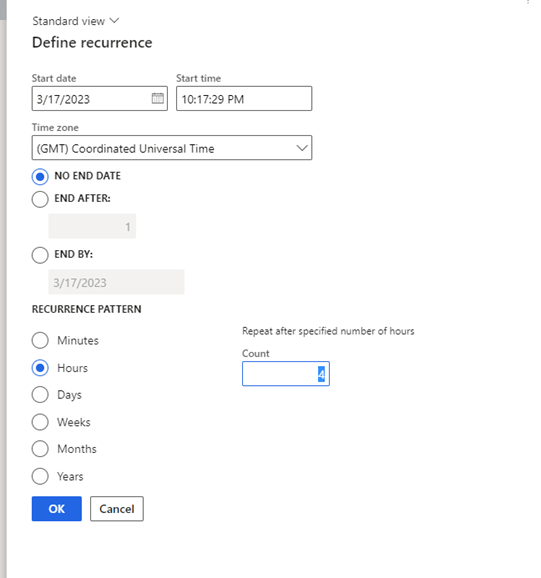
e.g You can set recurrence as every 4 hours or to run every day depending on your business requirement.
Batch Job recurrence –
File exported in the blob folder as per the configuration done in the System parameters form.

Thats all for now. If you have any questions feel free to comment.


I would want to manually select dimension set from parameter defined in contract class and based on that csv should be generated with no of columns as required in above selected dimension set as per user input.
Could you pls help on that, what changes would be required then.
LikeLike
Hi Sukrut, I am unable to see code pls provide
LikeLike