Microsoft has announced Model context protocol and MCP servers to provide standardize way for AI agents to connect with external tools and data sources. In this blog post we will take at what is MCP and how MCP tools can be utilized to work with finance and operations data.
MCP (Model Context Protocol) lets you connect your code, data, and tools to AI applications like Copilot, Claude and Cursor
What is Model context protocol?
If we break it down Model context protocol it has three words, Model, context and Protocol.
Model – Model is something you are already familiar with; we use model in our day-to-day life now days especially large language models or LLM’s. Some examples of these which you might be using every day are ChatGPT from OpenAI, Gemini from Google or Claude from Anthropic. If you look at Microsoft Copilot and try to create agents in it behind the scenes in Agent configurations you select model which agent is going to use.
Have you ever wondered how these models work? Most people think that when you ask a model something, it goes and searches the internet for answers. But that’s not how it works. In reality, it just tries to predict next word, they are language experts. They don’t know facts in real time or pull live data from web. Instead, they have been trained with huge amounts of data.

Context – Now let’s move to “Context”. In English, context means the subject or background of something. For example, when you send an email, you add a subject line. And just by looking at the subject, the recipient gets an idea of what the email is about – even before opening it.
Similarly, when you talk to a model like ChatGPT, Claude or Copilot chat, you provide a few lines – maybe a question or some background. That input becomes the “Context”. The model’s response entirely depends on the context you provide. It uses that context to start predicting the next word.
The response of the model is going to be based on the context you are going to provide. So, context is just background info – and the better context you give, the better the model can respond. That’s how these LLMs are designed to work
Protocol – Protocol means set of rules. As developers we work with set of rules all the time.
In a similar way, AI agents or AI-based applications also need to follow a structured approach when exchanging information.
Putting all it together Model Context Protocol”, is nothing but set of rules or protocols that define how to feed context into a model.
Why MCP is necessary?
Now that you understand what MCP is, let’s talk about why we need it. When we chat or provide prompt to any AI application, we ask it to explain something, generate code, refactor logic, generate image etc.
No let’s say you want to ask something to these models about data present on your local machine may be in your personal documents, Can these models access that data by default? No that’s where MCP server comes in.
If you connect your MCP server to your application, then here’s what happens: models still can’t access your files directly. But now, when you ask it a question, it will turn to this MCP server and say: “Hey, do you know anything about this?” And the MCP server – since you’ve built it to connect with your local files or databases – will fetch the relevant information, turn it into context, and feed that back to the model. Now the model has the necessary background to generate a smart, informed reply. You can connect to multiple MCP server from your agent to feed your models.
Prerequisites to try it with Finance and Operations
To use MCP server in finance and operations environment, make sure you have following components.
- Finance and operations apps must be at least 10.0.2263.17.
- The version of the Copilot in Microsoft Dynamics 365 Finance solution must be at least 1.0.3049.1.
- The version of the Copilot in Microsoft Dynamics 365 Supply Chain Management solution must be at least 1.1.03046.2.
It works well in UDE environments, so you can deploy UDE environment in US region with prerelease and try it out.
You can deploy UDE environment with prerelease with below commands
New-AdminPowerAppEnvironment -DisplayName “<<Environment Name>>” -EnvironmentSku Sandbox -Templates “D365_FinOps_Finance” -TemplateMetadata $jsonObject -LocationName “unitedstatesfirstrelease” –ProvisionDatabase
Using MCP server for Finance and Operations in Agent
To work with MCP server you need copilot studio. I have explained in my introductory article about how you can access Copilot studio.
First step is creating agent; in my scenario I am creating a simple agent for demonstration purposes in copilot studio and named it as Inventory Assistant. This agent is going to use MCP server tools to get inventory data as well as show released product for approved vendors. Currently Microsoft MCP server for ERP adds 13 static tools.

Once you create agent you can navigate to tools section and click on add a tool button.

Following pop up is going to appear where you can select Model context protocol Tab. As you can see in the screenshot below, there are different MCP servers available out of the box like MCP servers for Dataverse , GitHub, BOX and even for Microsoft Learn docs.

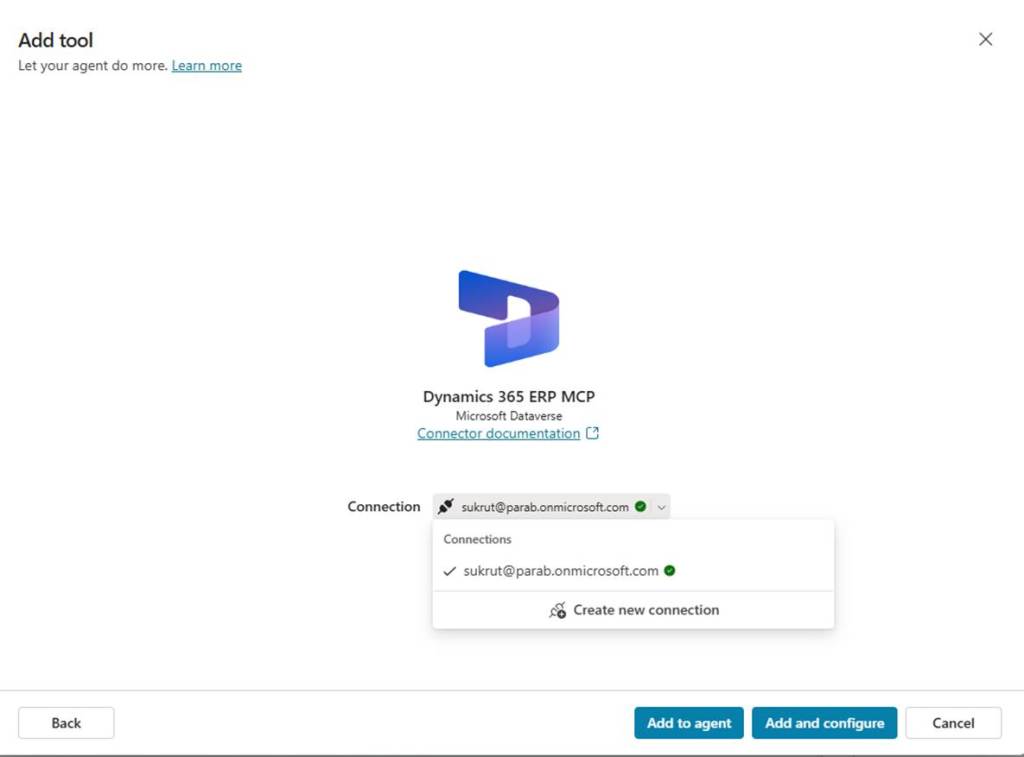
For this agent I added Dynamics 365 ERP MCP server. When you click on any MCP it asks for connection. You can create connection with account you have and then click Add and configure.
Once you add it, you can click on MCP server you have added, and it will show you all the tools available within it.
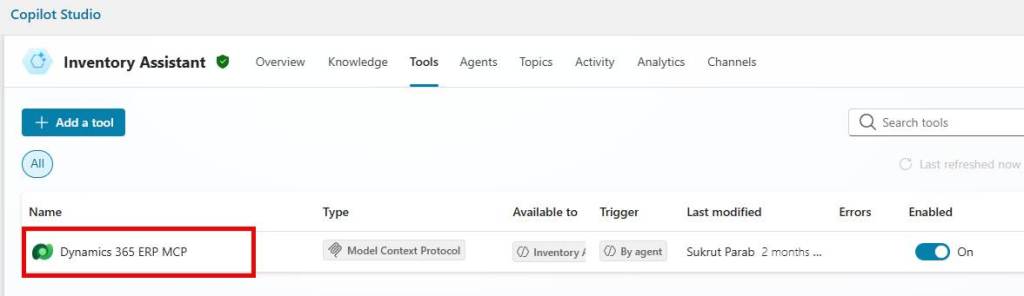
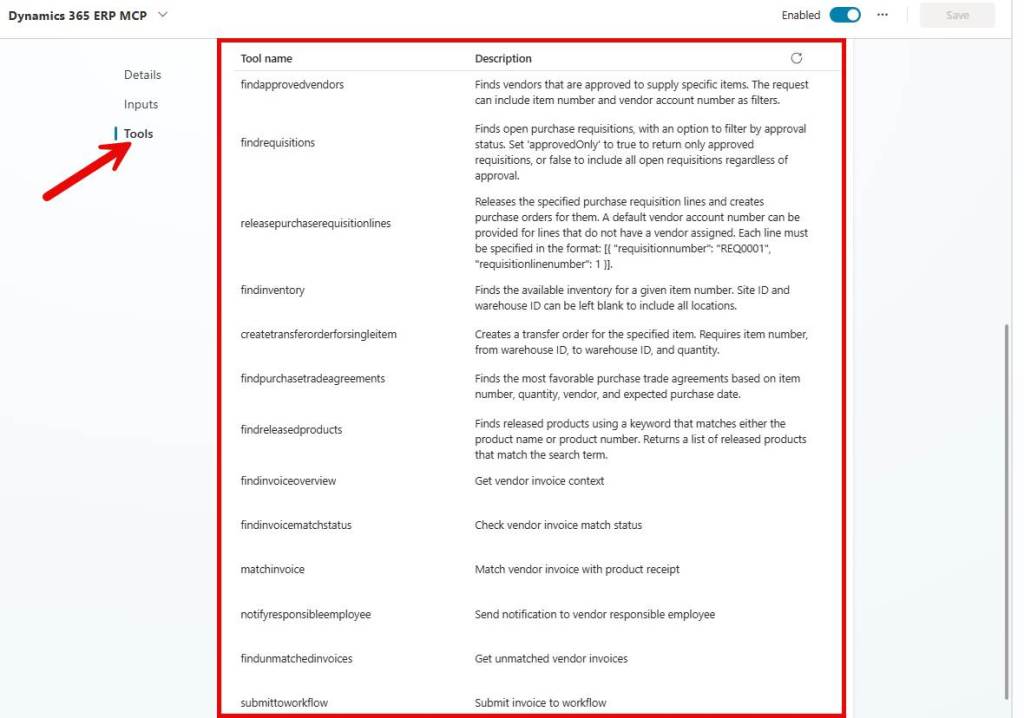
That’s it, now your agent model can use this MCP to find out data you need related to these operations from Finance and operations apps. Off course when you provide your prompt with context , model automatically connects to MCP server and gets the relevant information based on the context you have provided. If you have multiple MCP’s added in your agent, models are trained to go from one MCP to another MCP.
Now let’s test the agent to get the list of all items which have approved vendors. For that I gave a simple prompt to my agent “give me list of items which has approved vendors”
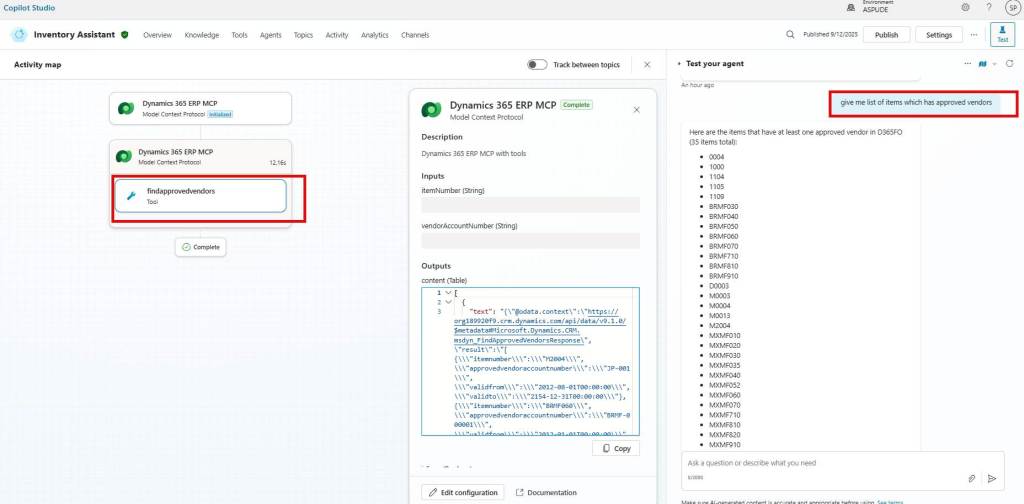
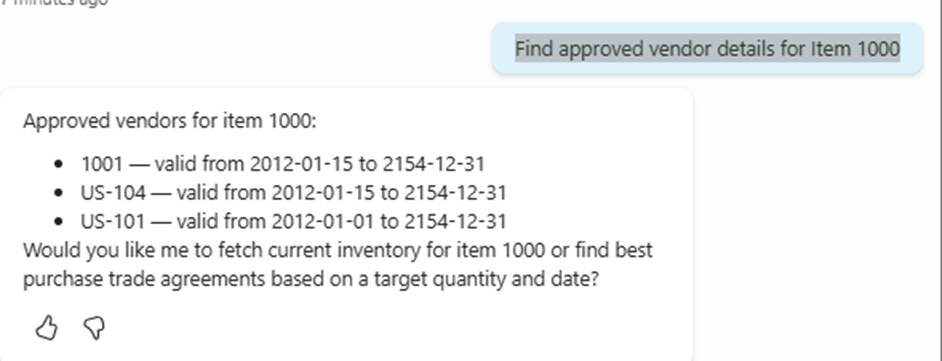
As you can see in above screenshot, agent automatically picks findapprovedvendors tool from ERP MCP and returned the list of items which has at least one approved vendor. Let’s change a prompt a little bit to get specifics. I changed, my prompt as “Find approved vendor details for Item 1000”
As you can see with changed in prompt same tool gave me approved vendors details for a specific item 100.
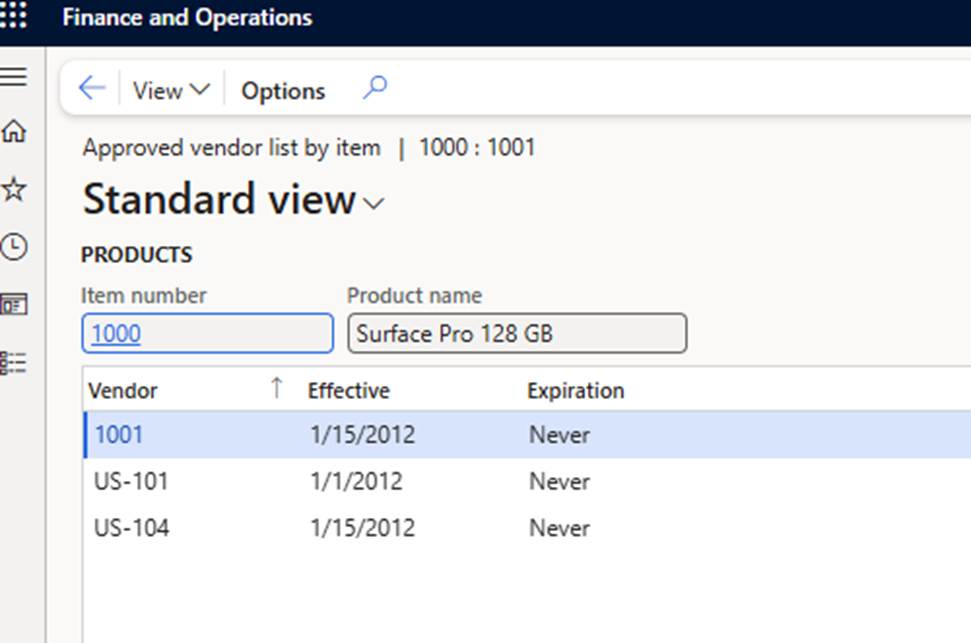
Here is F&O screenshot which shows list of approved vendors for item 1000.
MCP Architecture
MCP follows client server architecture where an MCP host — an AI application establishes connections to one or more MCP servers through MCP protocol.
And these MCP servers are in turn connected to external data sources, which could be local files or remote services like APIs, calendars, databases, ERP and so on.
Now what does the MCP server do? It retrieves data from those external sources, prepares the appropriate context, and feeds it back to the host using the MCP protocol. That context is then used by LLM to generate a relevant, natural-sounding response. Below diagram from MCP documentation shows how MCP works.
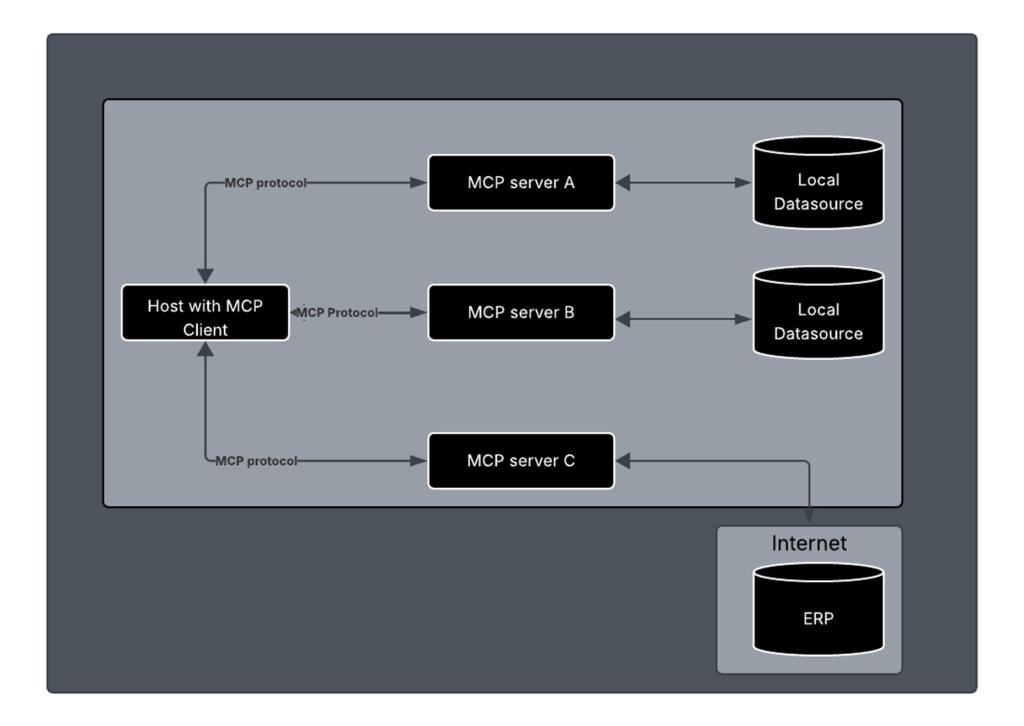
Let’s go over the components one by one.
Host – This is the AI application, something like Claude or chat GPT or Copilot, or even your own AI interface. If we compare this to traditional web architecture, the host is like the server of your website.
MCP client – MCP clients are instantiated by host applications to communicate with particular MCP servers. For example, in copilot studio, you go to tools and that’s where you add MCP server. You can build you own MCP client using available libraries
MCP server – It’s the tool you build that knows how to fetch or generate context from files, APIs, calendars, anything. You can make it with Node, Python, Java – anything you like. It can be reused across different AI apps. That’s the beauty of MCP.
Conclusion
MCP server is going to be a game changer in building agents as it acts as the bridge between tools, data, and AI models, making workflows more reliable and scalable. For ERP like F&O, we have different options to build agents where we can use combination of virtual entities as knowledge sources, custom MCP server tools, client plug ins or AI tools for F&O etc. to build agents.
Resources
MCP for beginners YouTube video series
MCP intro
MCP for Finance and operations
 e-Learn Dynamics 365 and Power platform